I bought my first paid affiliate linking tracking software (Ad Trackz Gold lol I know, but hey it was 2005) about six months too early. I’d read a forum thread full of six-figure affiliates swearing by it, assumed I needed the same setup, and spent a chunk of a slow month’s commissions on software that mostly sat there logging clicks I could have tracked for free. It wasn’t a disaster, but it wasn’t necessary either.
If you’re promoting affiliate offers through content, a free setup that covers Google Analytics 4, UTM tags, and your network’s own dashboard will tell you what you need for months, possibly longer. Once that stops being enough, the real decision isn’t just free versus paid; it’s whether you want a monthly bill or a one-time purchase you own outright, and what you’re giving up either way. That’s what the rest of this article walks through, tier by tier, against the same three questions each time: what problem does this solve, what does it cost, and what do you give up by choosing it?
Key Takeaways
- Most beginners need three free tools working together, not one paid platform: Google Analytics 4, UTM parameters, and their affiliate network’s built-in reporting.
- A WordPress link management plugin like Pretty Links or ThirstyAffiliates earns its modest yearly cost once you’re managing affiliate links across more than a handful of posts.
- Self-hosted trackers like WP Conversion Tracker and Simple Kuma add split testing, link rotation, and detailed reporting without a recurring bill, in exchange for running the software on your own site and taking on the maintenance that comes with that.
- Cloud trackers like ClickMagick and Voluum hand that maintenance to someone else and add features built for high-volume, multi-source paid traffic, which is what you’re paying the monthly cost for.
- Overseas software purchases, whether one-time or subscription, may attract 10% GST at checkout for Australian buyers, depending on the seller’s registration status. Hence, the advertised price isn’t always the final price.
The Decision in Four Steps
- Starting out, running content? The free stack- Google Analytics 4, UTM tags, and your network’s dashboard- covers what you need.
- Managing affiliate links across a growing site? A WordPress link plugin like Pretty Links saves you the manual work of updating them one by one.
- Need split testing or detailed attribution, but don’t want a subscription? A self-hosted tracker like WP Conversion Tracker or Simple Kuma gets you there for a one-time cost or free.
- Running high-volume paid traffic across multiple sources and want someone else managing the infrastructure? That’s the point a cloud tracker like ClickMagick or Voluum starts earning its monthly cost.
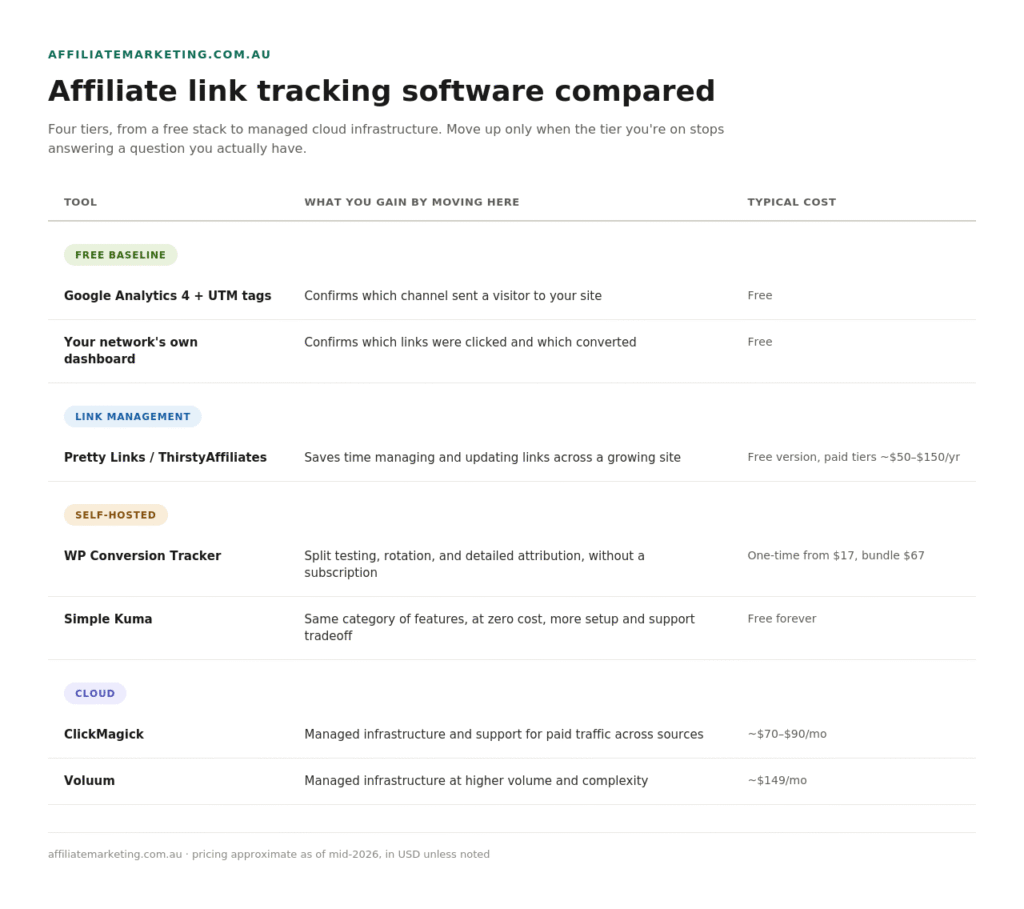
Compare the Options at a Glance
What Most Beginners Need First
Set up Google Analytics 4 on your site if it isn’t already running, and add UTM parameters to any off-site link that points back to your content, including forum posts, social posts, and guest content. That answers one specific question: how did this visitor find my site? It tells you nothing yet about which affiliate link they clicked once they got there, or which specific click actually generated a commission; those are two different questions.
For those two, your affiliate network’s own dashboard does the job. Most networks, from Awin to Commission Factory, provide this at no extra cost, because they already need to know which of your links were clicked and which of those clicks converted; that’s the data they use to pay you. Between GA4 telling you how people arrived and the network telling you what they clicked and bought, you’ve got all three questions covered without spending anything.
This combination has a real limitation: it doesn’t give you a unified view when you’re running content across multiple sites or promoting offers from several networks at once, since GA4 only sees your site traffic. Each network only shows you its own numbers. For most beginners running one site and a handful of network relationships, that gap doesn’t matter yet.
When a WordPress Link Plugin Earns Its Keep
Once you’re managing affiliate links across more than a handful of posts, a plugin like Pretty Links or ThirstyAffiliates starts paying for itself in the time it saves. Both let you turn long, ugly affiliate URLs into clean links that match your own domain, and both let you update a destination URL in one place rather than hunting through every post that links to it. Both offer a usable free version on WordPress.org, with paid tiers priced between $50 and $150 per year, depending on how many sites you’re running.
These are link managers with basic click counts overlaid, not full attribution platforms. If you want split testing, hourly breakdowns, or detailed conversion data, that’s the next tier up.
Self-Hosted Trackers: More Features, Without the Monthly Bill, In Exchange for Owning the Maintenance
This is the tier most comparison articles skip. The tradeoff between the two options is the same: you get a fuller feature set for less money over time, but the responsibility for hosting, backups, and server resources shifts from a vendor to you.
WP Conversion Tracker (what I personally use – its not the only tracker I use but it is fast becoming one of my favourites) is a WordPress plugin that covers a lot of the same ground as the paid cloud trackers: click tracking with six chart views, hourly and country breakdowns, device splits, split testing and link rotation on the Pro add-on, and postback integration with several payment platforms. You buy it once instead of paying monthly. The core plugin starts at $17, and the complete bundle with all five add-ons runs $67 as a one-time payment. Because it runs on your own WordPress installation, your click data is stored on your own server rather than in a third-party cloud.
I run paid and native ad traffic through this one myself, daily, and it holds up. No missed clicks that I’ve noticed, no drag on page speed, and setting up a postback against a native campaign was a five-minute job the first time I did it.
It’s not locked to any one niche. Beyond the dedicated one-click JVZoo and WarriorPlus setups, the postback integration also connects to ClickBank, PayPal, Stripe, and several other checkout platforms, so if your offers run through any of those, or you’re sending native or paid traffic to your own landing pages regardless of what you’re selling, the core tracker covers you.
The self-hosting tradeoff is real, though, and it’s worth being upfront about it rather than letting the guarantee paper it over. Your click and conversion history live in your own WordPress database, which means backups, uptime, and server resources are your job, not a vendor’s. On a small shared hosting plan, a database that grows with high click volume over months could eventually require attention you wouldn’t have to worry about on a cloud platform, where that’s handled for you. I haven’t personally run into that ceiling, so I can’t tell you exactly where it sits, only that it’s worth checking your hosting’s resource limits before you plan on serious volume through it. It also doesn’t come with dedicated fraud detection or a real-time cross-source dashboard, which platforms like Voluum are built specifically for. If that’s the problem you’re solving, a self-hosted WordPress plugin isn’t the right tool, whichever one you pick.
It’s sold through WarriorPlus with a 30-day money-back guarantee, which lowers the financial risk of testing it. That doesn’t remove the time cost of setting it up and confirming it actually fits your workflow, only the cost of being wrong about it.
Get WP Conversion Tracker here.
Simple Kuma (evaluated from documentation, not personally tested yet – coming soon!) takes the same self-hosted idea further: it’s completely free, open source under an AGPL licence, and built by a single developer. It offers unlimited campaigns, unlimited tracking domains, mobile-friendly stats, and a REST API, all self-hosted on your own server with the code publicly viewable on GitHub. The same self-hosting maintenance tradeoff above applies here, plus one more: support and update cadence depend on a single developer rather than a company, which the project is upfront about on its own site. For a beginner who wants zero cost and doesn’t mind the extra setup and that support tradeoff, it’s worth a look; go in knowing what you’re getting.
Simple Kuma: 100% Free Self-Hosted Tracker
Both need somewhere to live. If you’re already paying for WordPress hosting, WP Conversion Tracker adds no extra infrastructure. Simple Kuma needs its own PHP and MySQL environment, so check your hosting supports it before you commit an afternoon to the install.
When to Pay for a Cloud Tracker Instead
ClickMagick and Voluum (evaluated from documentation, not personally tested) are built for a different problem: comparing performance across multiple paid traffic sources in near real time, with the vendor handling infrastructure, uptime, and support rather than you. Pricing varies depending on the source you check. Still, ClickMagick’s entry plans generally run around $70 to $90 a month, and Voluum’s cheapest plan is around $149 a month, with both scaling well beyond that for higher volume.
If you’re not yet running paid traffic, or you’re running it on a single platform at a modest volume, the self-hosted option above may cover the same ground for much less money, provided you’re comfortable with the maintenance it entails. If you get to the point in our SEO vs paid traffic framework where you’re testing paid traffic across more than one source at real volume and would rather pay someone else to manage the infrastructure and fraud detection, that’s when a cloud tracker starts earning its ongoing cost.
The Australian Part of This
Most tools named above, aside from the free WordPress plugins, are sold by overseas suppliers billing in US dollars, whether that’s a subscription or a one-time purchase. Since mid-2017, overseas digital products and services sold to Australian consumers can attract 10% GST at checkout if the supplier meets the local registration threshold, so the advertised US dollar price isn’t always the final one. If you’re a GST-registered business, the ATO’s imported services rules generally treat these purchases as a reverse charge you self-assess, rather than GST added at checkout, provided you’ve given the supplier your ABN. However, the exact treatment depends on your registration status and the supplier’s setup. This isn’t tax advice and the specifics depend on your situation, so check the ATO’s guidance on imported services and digital products, or ask your accountant, before assuming how a particular purchase will be treated.
Frequently Asked Questions
Do I need paid tracking software to start affiliate marketing? No. Google Analytics 4, UTM tags, and your affiliate network’s own dashboard cover what most beginners need. Paid or self-hosted tracking software solves a problem that shows up later, once you’re managing links or campaigns at real scale.
What’s the difference between a WordPress link plugin and a self-hosted tracker like WP Conversion Tracker or Simple Kuma? A link plugin like Pretty Links manages and cleans up your affiliate URLs with basic click counts. A self-hosted tracker adds split testing, link rotation, and hourly or geographic breakdowns, a level of detail closer to what a cloud tracker offers, though without the dedicated fraud detection or real-time multi-source dashboards built into platforms like Voluum.
Should I choose a self-hosted tracker or a cloud subscription like ClickMagick or Voluum? Choose self-hosted if you want to avoid a recurring bill and are comfortable with your WordPress site or your own server carrying the maintenance load. Choose a cloud subscription if you’d rather pay someone else to handle uptime, support, and fraud detection, especially once you’re running high-volume paid traffic across several sources at once.
Will I get charged GST on tracking software bought from overseas? It depends on the supplier’s registration status and whether you’re a GST-registered business. Many overseas suppliers selling to Australian consumers do charge GST at checkout, on one-time purchases as well as subscriptions, so check the price you’re quoted rather than assuming the US dollar figure is final.
Does WP Conversion Tracker only work for internet marketing and info product niches? No. The core tracker works with any traffic source, including native ads, and any niche. Its postback integration covers ClickBank, PayPal, Stripe, and several other checkout platforms, including JVZoo and WarriorPlus, so it’s not limited to that one corner of the industry. JVZoo and WarriorPlus get a dedicated one-click setup if that’s where you’re selling.
The Bottom Line
Match your tracking setup to the problem you actually have, not to what worked for someone further along than you. Start with the free combination of Google Analytics 4, UTM tags, and your network dashboard. Add a link management plugin once you’re juggling more affiliate links than you can keep track of in your head. When you need split testing and detailed attribution, consider a self-hosted option like WP Conversion Tracker or Simple Kuma before you commit to a monthly bill, and move to a cloud tracker once high-volume paid traffic from multiple sources and someone else managing the infrastructure are genuinely part of your strategy.
Keep Learning
Affiliate Networks Explained: What They Do And Why They Matter: Understand what your network’s own dashboard already gives you before adding a third tool.
SEO vs Paid Traffic for Affiliate Marketing: Which Should Beginners Start With?: The framework this article’s cloud tracker recommendation builds on.
How to Drive Traffic to Your Affiliate Links Without Spending a Cent: Free traffic channels you can track with the free tools covered above.
Affiliate Marketing Glossary: 100+ Terms Every Beginner Should Know: UTM parameters, attribution, and everything else in this article are defined in plain English.